yt-dlp is a command-line tool for downloading audio and/or video from various sites including the most known youtube. The project is a fork of youtube-dl which is no longer maintained.
1. Install
With the frequent YouTube API updates, and the yt-dlp version present in official repositories that can sometimes be a bit outdated we can fall into a non working version. To access the newest features and updates, it is recommended to follow the officially suggested methods using curl or wget, as indicated below. These way ensure that we acquire the most up-to-date version of yt-dlp.
sudo curl -L https://github.com/yt-dlp/yt-dlp/releases/latest/download/yt-dlp -o /usr/local/bin/yt-dlpor :
sudo wget https://github.com/yt-dlp/yt-dlp/releases/latest/download/yt-dlp -O /usr/local/bin/yt-dlpand then make the binary executable :
sudo chmod a+rx /usr/local/bin/yt-dlpto update :
yt-dlp -Uyt-dlp supports Python 3.7 and above. Be sure to have python 3.7 and higher installed to use pip method :
python3 -m pip install -U "yt-dlp[default]"to update :
python3 -m pip install -U "yt-dlp[default]"2. List available formats of each video.
yt-dlp --list-formats https://youtu.be/u5lSeYd_riw
or
yt-dlp -F https://youtu.be/u5lSeYd_riw
3. Choose which format for download
If no option passed to yt-dlp, the "best video format is used by default. To choose a specific resolution we will pass the output of the -F option to the download command.
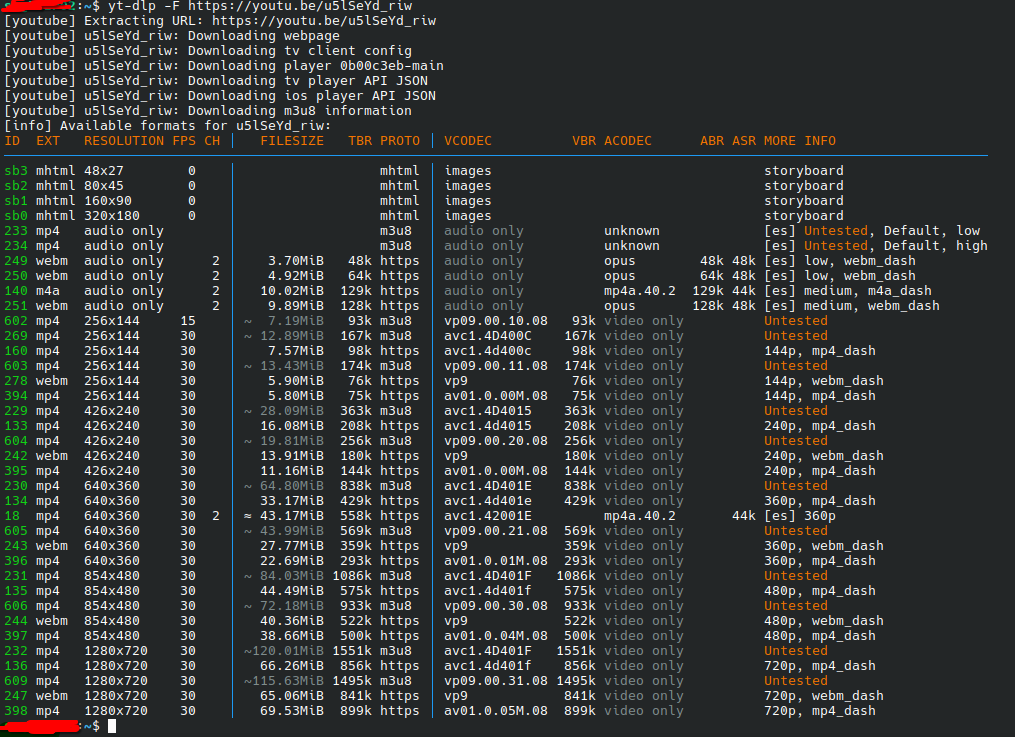 Some common formats for audio and video used by YouTube platform:
- best : select the highest video and audio format, this is the default option for yt-dlp
- bestvideo : selects the best video-only (no audio) or dash video
- worst : selects the lowest quality for audio and video
- worstvideo : selects the lowest video-only quality
- bestaudio, bestvideo : Respectively best quality audio-only and best quality video-only
Examples of use :
- b*, best*: Select the best quality format that contains either a video or an audio or both
- b, best: Select the best quality format that contains both video and audio
- bv*, bestvideo*: Select the best quality format that contains video. It may also contain audio.
- ba, bestaudio: Select the best quality audio-only format.
- ba*, bestaudio*: Select the best quality format that contains audio. It may also contain video.
- w*, worst*: Select the worst quality format that contains either a video or an audio
- w, worst: Select the worst quality format that contains both video and audio.
- wv, worstvideo: Select the worst quality video-only format.
-
wv*, worstvideo*: Select the worst quality format that contains video. It may also contain audio.
Download and merge the best video-only format and the best audio-only format. For this commands to succeed note that ffmpeg or avconv are used and thus, becomes necessary dependencies.
yt-dlp -f "bv+ba/b" <video url>Download best format that contains video :
yt-dlp -f "bv*+ba/b" <video url>Download the best video-only format and the best audio-only format without merging them. For this case, an output template should be used since by default, bestvideo and bestaudio will have the same file name.
yt-dlp -f "bv,ba" <video url> -o "%(title)s.f%(format_id)s.%(ext)s"Download the best video available but with the smallest resolution
yt-dlp -S "+res" <video url>Download the smallest video available
yt-dlp -S "+size,+br" <video url>Download the best video available but no better than 480p, or the worst video if there is no video under 480p
yt-dlp -f "bv*[height<=480]+ba/b[height<=480] / wv*+ba/w" <video url>Download the best video (that also has audio) that is closest in size to 50 MB
yt-dlp -f "b" -S "filesize~50M" <video url>source : yt-dlp Github project page
About Me

aedes: The sanctuary in Latin language. This website is related to my fields of interrest...
Gallery




social




Translate








