40 useful Linux commands
1. User & Login Information
1.1 who
Shows users currently logged in.
who
sc       tty1         2025-11-05 08:11
1.2 w
Displays who is logged in and their activity.
w

09:34:20 up  1:23,  1 user,  load average: 1,97, 2,00, 1,93
USER     TTY      FROM             LOGIN@   IDLE   JCPU   PCPU  WHAT
sc       tty1     -                08:11    1:22m  0.06s  0.06s /usr/bin/startplasma-wayland
1.3 whoami
Prints current effective username.
whoami

sc
1.4 last
Lists user login history. Syntax last [user]
last sc
sc       tty1                          Wed Nov  5 08:11   still logged in
sc       tty1                          Tue Nov  4 23:15 - down   (00:03)
sc       tty1                          Tue Nov  4 07:38 - down   (09:59)
sc       tty1                          Tue Nov  4 07:12 - down   (00:23)
1.5 chage
Manages user password expiry info. Syntax chage [options] user
chage -l sc

Last password change                                    : oct. 27, 2024
Password expires                                        : never
Password inactive                                       : never
Account expires                                         : never
Minimum number of days between password change          : 0
Maximum number of days between password change          : 99999
Number of days of warning before password expires       : 7
2. Calculation & Date Commands
2.1 cal
Displays a calendar for a specific month or year. Syntax cal [month] [year]
cal 12 2025

Décembre 2025
di lu ma me je ve sa
1  2  3  4  5  6
7  8  9 10 11 12 13
14 15 16 17 18 19 20
21 22 23 24 25 26 27
28 29 30 31
2.2 bc
Command-line calculator for integer and floating-point math.
echo "5.2*3" | bc

15.6
2.3 expr
Evaluates arithmetic or string expressions. Syntax expr expression .
Note :
Each term in the expression (operands and operators) must be separated by spaces.
Characters that have special meaning to the shell (e.g., *, <, >) must be escaped with a backslash (\) or enclosed in quotes to ensure expr processes them correctly.
expr primarily works with integers for arithmetic operations. For floating-point calculations, other tools like bc are generally preferred.
expr 330 + 110528

110858

expr 120 \* 95

11400
2.4 factor
Displays prime factors of a number. Syntax factor [number].
factor 45

45: 3 3 5
3. File & Text Manipulation
3.1 head
Displays first lines of a file. Syntax head [options] [file.
head -n 5 books.log

1. Les Misérables | Victor Hugo | Format: Poche | Pages: 1232
2. Madame Bovary | Gustave Flaubert | Format: Poche | Pages: 464
3. Le Père Goriot | Honoré de Balzac | Format: Poche | Pages: 368
4. Oscar et la dame rose | Éric-Emmanuel Schmitt | Format: Poche | Pages: 112
5. Monsieur Ibrahim et les fleurs du Coran | Éric-Emmanuel Schmitt | Format: Poche | Pages: 96
3.2 tail
Displays last lines of a file. Syntax tail [options] [file].
tail  -n 5 books.log
7. Stupeur et tremblements | Amélie Nothomb | Format: Poche | Pages: 160
8. Vernon Subutex 1 | Virginie Despentes | Format: Poche | Pages: 352
9. Couleur du temps | Leïla Slimani | Format: Poche | Pages: 224
10. La vie est facile, ne t'inquiète pas | Agnès Martin-Lugand | Format: Poche | Pages: 288
11. book book title | author author | size: pocket standard | Pages: 1000 500 500 500
3.3 sort
It sorts lines of text in a file or from standard input. It arranges data in a specified order, making it easier to read and analyze.
By default, sort performs an alphabetical sort based on the ASCII values of characters.
Syntax sort [options] [file].
sort -nr books.log

11. book book title | author author | size: pocket standard | Pages: 1000 500 500 500
10. La vie est facile, ne t'inquiète pas | Agnès Martin-Lugand | Format: Poche | Pages: 288
9. Couleur du temps | Leïla Slimani | Format: Poche | Pages: 224
8. Vernon Subutex 1 | Virginie Despentes | Format: Poche | Pages: 352
7. Stupeur et tremblements | Amélie Nothomb | Format: Poche | Pages: 160
6. L'Étranger | Albert Camus | Format: Poche | Pages: 186
5. Monsieur Ibrahim et les fleurs du Coran | Éric-Emmanuel Schmitt | Format: Poche | Pages: 96
4. Oscar et la dame rose | Éric-Emmanuel Schmitt | Format: Poche | Pages: 112
3. Le Père Goriot | Honoré de Balzac | Format: Poche | Pages: 368
2. Madame Bovary | Gustave Flaubert | Format: Poche | Pages: 464
1. Les Misérables | Victor Hugo | Format: Poche | Pages: 1232
The above command sorts the file numerically and in reverse order.
3.4 uniq
Filters or counts repeated lines in sorted files. Syntax uniq [options] [file].
Note :
uniq only detects adjacent duplicate lines. For accurate results when dealing with files where identical lines might not be consecutive, it is essential to first sort the file using the sort command and then pipe its output to uniq.
cat input.txt

line1
line1
line2
line3
uniq input.txt > output.txt
line1
line2
line33.5 diff
Compares two text files line by line. Syntax diff [file1] [file2].
diff input.txt output.txt
2d1
< line1
3.6 cmp
Compares two files byte by byte. It is primarily used for comparing binary files, but can also be used for text files.
Syntax cmp [file1] [file2].
cmp input.txt output.txt

input.txt output.txt differ: byte 11, line 2
3.7 cksum
Prints file checksum and size. It is primarily used to verify the integrity of files, particularly after transmission or storage, to detect accidental corruption.
Syntax cksum [file].
cksum input.txt

3166170286 24 input.txt
where 3166170286 is the CRC checksum and 24 is the byte count.
Note that cksum is not designed for cryptographic security. It does not protect against deliberate tampering, as an attacker could potentially modify a file to produce the same checksum. For cryptographic integrity checks, one should use commands like sha256sum.
3.8 split
Splits large files into smaller parts.
Syntax split [options] [file] [prefix].
split -b 1M large.bin part_

ls -l
total 6408
-rw-rw-r-- 1 sc sc 3277056 juin  18 18:21 large.bin
-rw-rw-r-- 1 sc sc 1048576 nov.   5 14:19 part_aa
-rw-rw-r-- 1 sc sc 1048576 nov.   5 14:19 part_ab
-rw-rw-r-- 1 sc sc 1048576 nov.   5 14:19 part_ac
-rw-rw-r-- 1 sc sc  131328 nov.   5 14:19 part_ad
we can also split text files with desired number o lines :
split -l 5 books.log books_part_

ls -l

total 16
-rw-rw-r-- 1 sc sc 820 oct.  10 12:56 books.log
-rw-rw-r-- 1 sc sc 371 nov.   5 14:24 books_part_aa
-rw-rw-r-- 1 sc sc 363 nov.   5 14:24 books_part_ab
-rw-rw-r-- 1 sc sc  86 nov.   5 14:24 books_part_ac
3.9 stat
Displays detailed file or filesystem info such as size, permissions, ownership, timestamps, and inode information. This information is more extensive than what is typically provided by commands like ls -l.
Syntax stat [file].
stat input.txt

File: input.txt
Size: 24              Blocks: 8          IO Block: 4096   regular file
Device: 259,4   Inode: 2883836     Links: 1
Access: (0664/-rw-rw-r--)  Uid: ( 1000/      sc)   Gid: ( 1000/      sc)
Access: 2025-11-05 10:55:50.193979944 +0100
Modify: 2025-11-05 10:55:49.451994457 +0100
Change: 2025-11-05 10:55:49.451994457 +0100
Birth: 2025-11-05 10:55:01.925918570 +0100
3.10 locate
Finds files and directories quickly. It operates by searching a pre-built database of file paths, which makes it significantly faster than commands like find that traverse the filesystem in real-time.
Before using locate for the first time or if recently files were added or removed, the database must be updated. This is done with the updatedb command, usually run with sudo: sudo updatedb
Syntax locate [pattern]
sudo apt install plocate
...............
Initializing plocate database; this may take some time... done
Created symlink /etc/systemd/system/timers.target.wants/plocate-updatedb.timer → /usr/lib/systemd/system/plocate-updatedb.timer.
Traitement des actions différées (« triggers ») pour man-db (2.12.0-4build2) ...
Not building database; man-db/auto-update is not 'true'.
....
sudo updatedb
locate IMG_20250623_082311.jpg
/home/sc/Downloads/IMG_20250623_082311.jpg3.11 dir
Lists directory contents (like ls). Syntax dir [options] [dir].
dir /home/sc/Public

avidemux_2.8.1.appimage  client1.ovpn  client22.ovpn  client2.req   client3.req
client11.ovpn            client1.req   client2.ovpn   client3.ovpn  server.req
4. User & Login Information
4.1 ps
Shows information about running processes. Syntax ps [options]
ps aux

USER         PID %CPU %MEM    VSZ   RSS TTY      STAT START   TIME COMMAND
root           1  0.1  0.2  23728 14276 ?        Ss   08:11   0:47 /sbin/init splash
root           2  0.0  0.0      0     0 ?        S    08:11   0:00 [kthreadd]
root           3  0.0  0.0      0     0 ?        S    08:11   0:00 [pool_workqueue_release]
................
4.2 pstree
Displays processes as a hierarchical tree. Syntax pstree [options]
pstree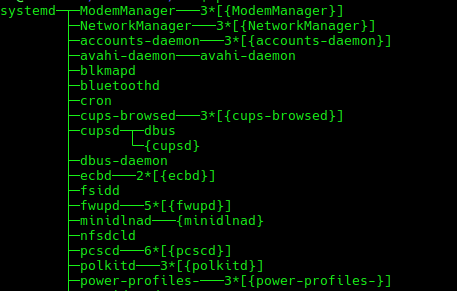
4.3 pmap
Displays memory map of a process.. Syntax pmap [pid]
pmap 1432

1432:   [nfsd]
total                0K
4.4 nice
Runs a command with adjusted CPU priority. It's purpose is to launch a new process with a specified niceness value, thereby affecting its priority in the CPU scheduling queue. The niceness value ranges from -20 to 19.
- -20 (highest priority): Processes with lower (more negative) niceness values receive more CPU time. Only the root user can set negative niceness values.
- 19 (lowest priority): Processes with higher (more positive) niceness values receive less CPU time. Any user can set positive niceness values.
- The default niceness value for a new process is typically 0.
Syntax nice -n [value] [cmd]
nice -n 10 gzip file4.5 ionice
Sets I/O scheduling priority for a process. Syntax ionice [opts] [cmd]
ionice -c2 -n7 tar czf backup.tgz /home/sc/csv
4.6 chrt
Sets or gets real-time scheduling policy. Syntax chrt [options] [priority] [cmd]
sudo chrt -f 10 ./task.sh4.7 mpstat
Displays per-CPU usage statistics. Syntax mpstat [interval] [count]
It is part of the sysstat package.
mpstat 2 34.8 nproc
Shows number of available CPU cores. It is part of the GNU Core Utilities.
nproc

8
5. System Information & Configuration
5.1 env
Displays or modifies environment variables. Syntax env [name=value] [cmd]
Example : Changing the Working Directory: The -C or --chdir=DIR option changes the working directory for the command being executed.
env -C /home/sc/Documents/awk cat input.txt env is frequently used in shell scripts, particularly in the shebang line (e.g., #!/usr/bin/env python), to ensure the script is executed by the correct interpreter, making the script more portable.
5.2 hostnamectl
Displays or changes system hostname and info. Syntax hostnamectl [options]
hostnamectl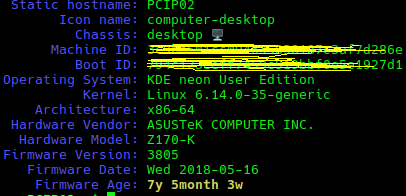
5.3 dmidecode
Displays hardware and BIOS information.
sudo dmidecode -t bios

# dmidecode 3.5
Getting SMBIOS data from sysfs.
SMBIOS 3.0.0 present.

Handle 0x0000, DMI type 0, 24 bytes
BIOS Information
Vendor: American Megatrends Inc.
Version: 3805
Release Date: 05/16/2018
Address: 0xF0000
Runtime Size: 64 kB
ROM Size: 16 MB
Characteristics:
PCI is supported
.......
5.4 service
Starts, stops, or manages system services. Syntax service [service] [cmd]
sudo service ssh restart5.5 kmod
Manages Linux kernel modules. Syntax kmod [command]
The commands most users are familiar with, such as lsmod, rmmod, modinfo, modprobe, and depmod, are typically symbolic links pointing to the kmod binary. This means when we run lsmod, we execute kmod with the list command.
kmod list

Module                  Size  Used by
rfcomm                102400  18
snd_seq_dummy          12288  0
snd_hrtimer            12288  1
qrtr                   53248  2
cmac                   12288  2
algif_hash             16384  1
algif_skcipher         16384  1
af_alg                 32768  6 algif_hash,algif_skcipher
bnep                   32768  2
snd_hda_codec_hdmi     98304  1
...........
5.6 pwd
Prints current working directory.
pwd

/home/sc
6. Bash Utilities & Flow Control
6.1 sleep
Pauses the execution of a script or command for a specified duration. This duration can be expressed in seconds, minutes, hours, or days.
Syntax env [name=sleep] [time][SUFFIX]
SUFFIX: An optional suffix to specify the unit of time.
-
s (seconds - default if no suffix is provided)
-
m (minutes)
-
h (hours)
-
d (days) Pause for 1 hour and 30 minutes:
sleep 1h 30m6.2 yes
Repeats a string until interrupted. Syntax
yes [string] -
The most common and practical use of yes is to automatically provide "yes" or "no" responses to interactive commands or scripts that prompt for user confirmation. This is achieved by piping the output of yes into the command requiring input.
-
The yes command can be used to quickly create large files by redirecting its output to a file. This can rapidly consume disk space, so use it with awareness of available storage.
yes | rm -i *.txt
6.3 whatis
Displays a brief description of a command. Syntax whatis [cmd]
whatis mv

mv (1)               - move (rename) files
7. Fun & Visual Terminal Effects
6.1 sl
Displays a steam locomotive animation.
sl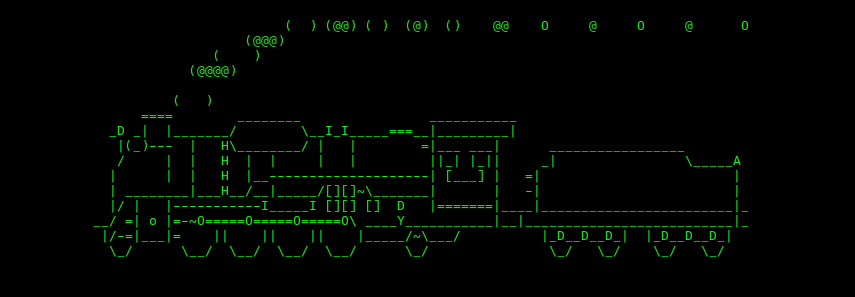
6.2 banner
Prints text as a large ASCII banner. Syntax banner [text]
Originally, banner was designed for creating large-format printouts on dot-matrix printers, but its use has evolved to display messages directly within the terminal.
The banner command may not be installed by default on all Linux distributions. On debian systems it can typically be installed using
sudo apt install sysvbanner.
banner Linux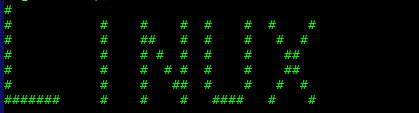
6.3 aafire
Displays an ASCII-art fire animation.
It is part of the aalib library, which is designed for converting visual images into ASCII art. On debian systems we might need to install aalib first if it's not already present, the name differs from other distributions such as fedora or Arch (aalib) :
sudo apt install libaa-bin.
aafire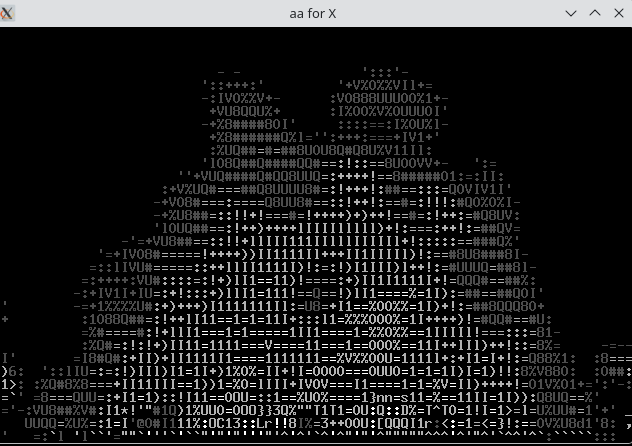
6.4 cowsay
cowsay generates ASCII art pictures of a cow (or other animals) with a message in a speech or thought bubble.
-
Cow Files (-f flag): cowsay comes with various "cow files" that represent different animals or characters (e.g., elephant, tux, vader). To list available cow files : cowsay -l and use them with the -f flag.
-
Cowthink (cowthink command): displays the message in a thought bubble instead of a speech bubble
-
Cow Modes : modify the cow's appearance or state using various flags:
- -b: Borg mode
- -d: Dead appearance
- -p: Paranoid
- -s: Stoned appearance
- -t: Tired appearance
- -y: Youthful appearance
cowsay -l

Cow files in /usr/share/cowsay/cows:
apt bud-frogs bunny calvin cheese cock cower daemon default dragon
dragon-and-cow duck elephant elephant-in-snake eyes flaming-sheep fox
ghostbusters gnu hellokitty kangaroo kiss koala kosh luke-koala
mech-and-cow milk moofasa moose pony pony-smaller ren sheep skeleton
snowman stegosaurus stimpy suse three-eyes turkey turtle tux unipony
unipony-smaller vader vader-koala www
cowsay -f daemon "I use FREEBSD!"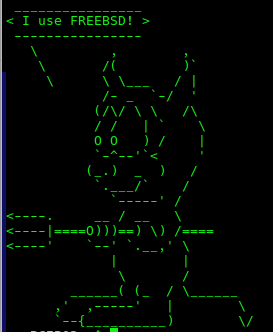
cowsay -d "I'm dead tired."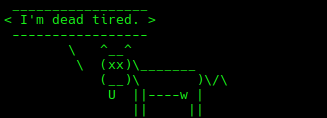
cowthink "Hmm, what should I eat for dinner?"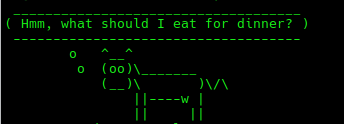
fortune | cowsay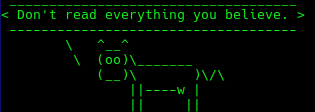
6.5 fortune
fortune displays a random, often humorous, insightful, or philosophical message from a database of quotations. It's a classic command-line tool that has been part of Unix and Linux systems for decades.
Before using fortune, on debian systems it can typically be installed using :
sudo apt install fortune-mod.
fortune

The abuse of greatness is when it disjoins remorse from power.
-- William Shakespeare, "Julius Caesar"About Me

aedes: The sanctuary in Latin language. This website is related to my fields of interrest...
Gallery




social




Translate








