1. nfsstat
nfsstat is a command-line utility that displays statistical info about the Network File System (NFS) and Remote Procedure Call (RPC) calls. It is a part of the nfs-utils package.
To display information about the number of RPC and NFS calls received and rejected by the server :
nfsstat -s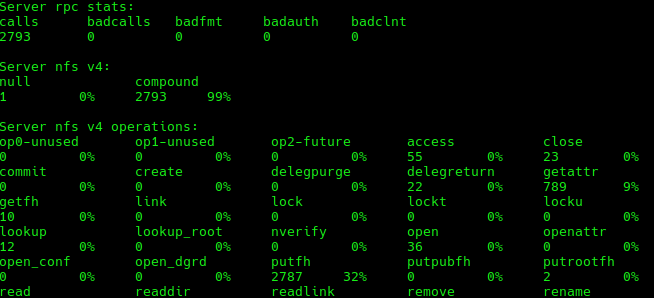
| option | Description |
|---|---|
| -s | Displays statistics for the NFS server.. |
| -c | Displays statistics for the NFS client.. |
| -n | Shows only NFS statistics (no RPC details).. |
| -r | Displays RPC (Remote Procedure Call) statistics. |
| -m | Shows information about each mounted NFS file system. |
| -v | Displays detailed output (verbose mode). |
| -z | Resets all NFS statistics to zero after displaying them. |
| -h | Displays help information about the command usage. |
| -d | Displays detailed per-procedure statistics. |
| -o | Shows only specific types of statistics (e.g., nfs, rpc). |
2. nfsiostat
The nfsiostat command is used on the NFS client to check its performance when an nfs share is mounted. It relies on the /proc/self/mountstats file to gather its data. It can help identify performance bottlenecks or latency issues on NFS mounts.
nfsiostat
The values to check particularly are:
- retrans : the number of retransmissions.
- avg RTT (ms) : the average time from the point the client sends RPC requests until it receives the response
- avg exe (ms) : the average time from the point the client sends RPC requests to the kernel until the requests are completed
High values indicates there is latency problems on the network and can lead to jerking of the picture when watching a movie or timeouts even on office tasks .
To get statistics for a specific mount point (e.g., /mnt/nfs):
nfsiostat /mnt/nfs
To see (10) reports, with each report taken (5) seconds apart:
nfsiostat 5 10About Me

aedes: The sanctuary in Latin language. This website is related to my fields of interrest...
Gallery




social




Translate








