1. Cron job, crontab and cron daemon
Cron is the most used tool to automate repetitive tasks such as running command or scripts at specified time intervals (minutes, hours, days, etc...) allowing to perform maintenance, backups, update systems or data processing. Cron uses configuration files with five fields for time schedule and a field for the command or script to launch.
- Cron job : A command or script scheduled to run automatically.
- Crontab : The configuration file where cron jobs are defined, managed with commands like crontab -e (edit) and crontab -l (list).
- Cron daemon : A background process that constantly checks for and executes scheduled jobs.
Note : System vs. User Crontabs
User Crontabs: Each user has their own crontab file managed via the crontab -e command. Jobs run with that user's permissions.
System Crontab: Located at /etc/crontab or in /etc/cron.d/, these files handle system-wide tasks and require root privileges to edit. These files include an extra field to specify which user the command should run as.
2. Crontab
2.1 Syntax :
A standard cron entry consists of five time fields followed by the command to execute:

Note that for the two last fields, we can use names or numbers :
month : 1-12 or jan, feb, etc...
day of the week : 0 - 6 : sunday to saturday (0 or 7(non-standard) is Sunday, or names)
2.2 Special Characters:
- * (Asterisk): "Every" (e.g., * in the minute field means every minute).
- , (Comma): Specifies a list of values (e.g., 1,5 in the hour field).
- - (Hyphen): Defines a range (e.g., 9-17 for working hours).
- / (Slash): Specifies step intervals (e.g., */10 for every 10 minutes).
Note that some systems can accept non-standard values :
- @yearly Run every January 1 (0 0 1 1 *).
- @annually The same as @yearly.
- @monthly Run the first day of every month (0 0 1 ).
- @weekly Run every Sunday (0 0 0).
- @daily Run every midnight (0 0 *).
- @hourly Run every hour, on the hour (0 ).
- @reboot Run once, at startup.
Example : Execute a backup script the first of every month
@monthly /home/sc/backup.sh2.3 Essential commands
-
Check that the cron daemon is running :
systemctl status cron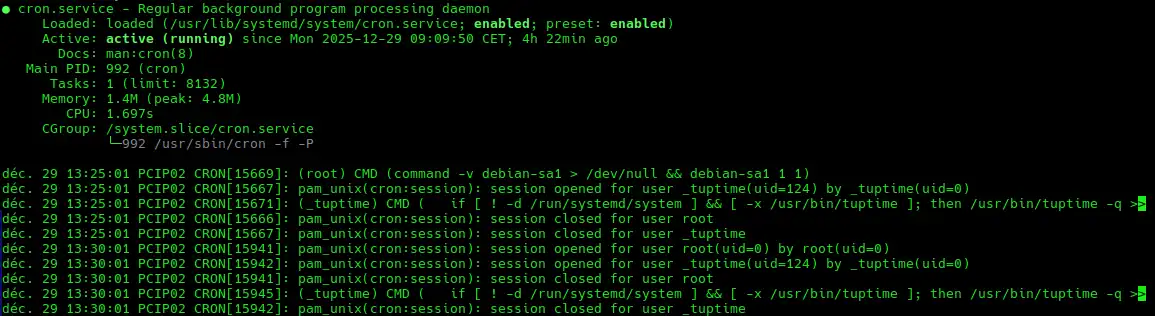
-
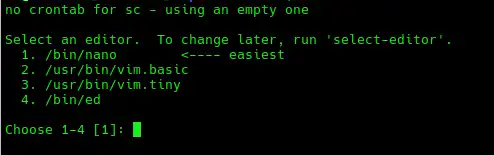
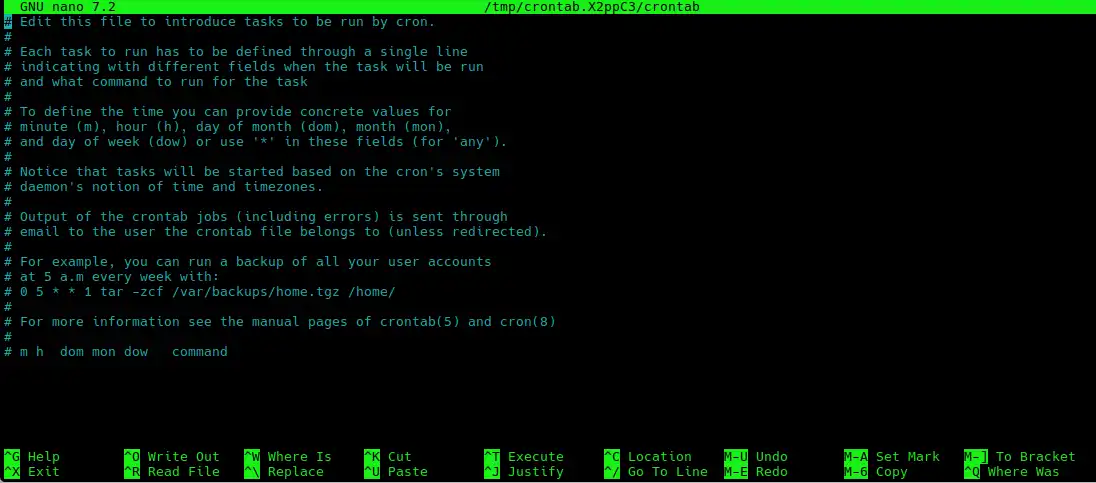
Edit or create a crontab :
crontab -eThen choose the preferred editor :
Add the line at the end of the following file :
Example : Using the afraid free dynamic DNS update service
# You might need to include this path line in crontab, (or specify full paths)
PATH=/sbin:/bin:/usr/sbin:/usr/bin:/usr/local/sbin:/usr/local/bin
2,7,12,17,22,27,32,37,42,47,52,57 * * * * sleep 47 ; wget --no-check-certificate -O - https://freedns.afraid.org/dynamic/update.php?UnRxxxxxxxxxxxxxxxxxxxxxxxxxxxxxxxxxxxxxxxxxxxxxxxxxxxxxxxxxx2NTQ3 >> /tmp/freedns_aedesc_dnet_hu.log 2>&1 &
The above crontab entry updates DNS every five minutes.
-
List crontabs
crontab -l -
Delete all crontabs
crontab -i -rThe interactive (-i) flag asks for confirmation before removing all scheduled tasks.
2.4 System crontab
When crontab -e is invoked, all commands run as the user who created the crontab, it allows individual users to schedule their own tasks.
The root user can also have a user crontab which can be used to schedule tasks that do not exist in the system crontab, crontab -e -u root will not edit /etc/crontab.
The format of the system crontab, /etc/crontab includes a who column which does not exist in user crontabs, cron runs the command as the user specified in this column.
#minute hour    mday    month   wday    who     command
30 2 * * * root /usr/bin/apt update && /usr/bin/apt upgrade -y
this example runs an update/upgrade daily at 2:30 AM as the root user.
To edit the system wide crontab :
sudo crontab -eGeneral maintenance scripts that don’t need to run at a precise time, can be placed in predefined system directories. Cron runs executable scripts found in these locations:
/etc/cron.hourly/
/etc/cron.daily/
/etc/cron.weekly/
/etc/cron.monthly/
/etc/cron.yearly/
ls -l /etc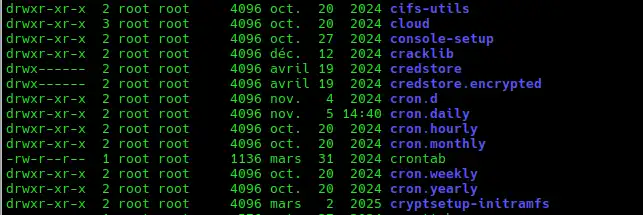
Note :
Filenames can include only uppercase and lowercase letters, digits, underscores (_), and hyphens (–).
Filenames must not use file extensions or contain dots (.)
3. Useful and practical examples
3.1 Backup a website every every day at 2:00 AM
0 2 * * * tar -czf /backup/site-$(date +\%F).tar.gz /var/www/htmlThe command compresses the website directory and saves a dated backup in /backup
3.2 Clean old log files once a week
30 3 * * 0 find /var/log -type f -name "*.log" -mtime +7 -deleteEvery Sunday at 3:30 AM .log files older than 7 days are deleted which prevents disk space from filling up.
3.3 Restart a web service daily
0 4 * * * systemctl restart nginxThe command Restarts the Nginx web server which is useful for applying config changes or preventing memory leaks.
3.4 Update the system
00 6 * * 1 pacman -SyuUpdates and upgrades the system each monday at 6.00 am just before starting work.
3.5 Restart the raspberry pi based NVR
0 3 */2 * * /sbin/rebootReboots the NVR every two days, but for a more precise approach [systemd timers]()are preferred.
Source :
OpenBSD man pages
cronitor
hostinger
freebsd docs
About Me

aedes: The sanctuary in Latin language. This website is related to my fields of interrest...
Gallery




social




Translate








